PCN Management Software: A Practical Evaluation Guide
Learn how to evaluate software for PCN intake, affected-part extraction, BOM matching, ownership, deadlines, and resolution tracking.
- Extract affected MPNs and critical dates
- Match notices against active BOMs
- Identify affected products and assemblies
- Assign owners and track the response to closure
Available on Starter and Team. A payment method is required.
Do you need dedicated PCN management software?
A shared inbox and spreadsheet can work when notice volume, BOM count, and product complexity are low. A dedicated workflow becomes valuable when the process starts depending on repeated manual cross-referencing, informal ownership, and individual memory.
0 of 8 selected
What the workflow looks like
The same three steps a focused PCN tool runs every time a notice arrives: ingest, extract and review, then match to your BOMs and assign an owner.
- 1Intake
Forward an email or upload the PDF; the original notice is preserved.
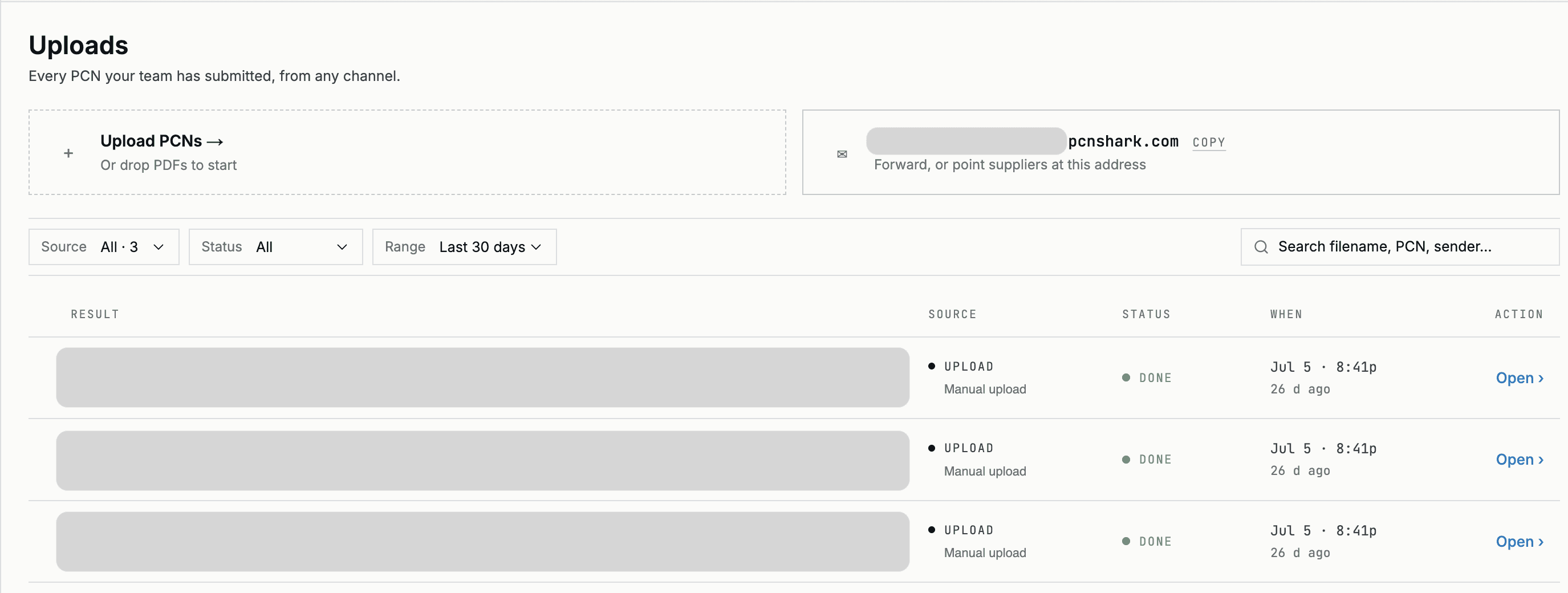
- 2Extract and verify
Affected MPNs, notice type, and key dates are extracted and a reviewer confirms them.
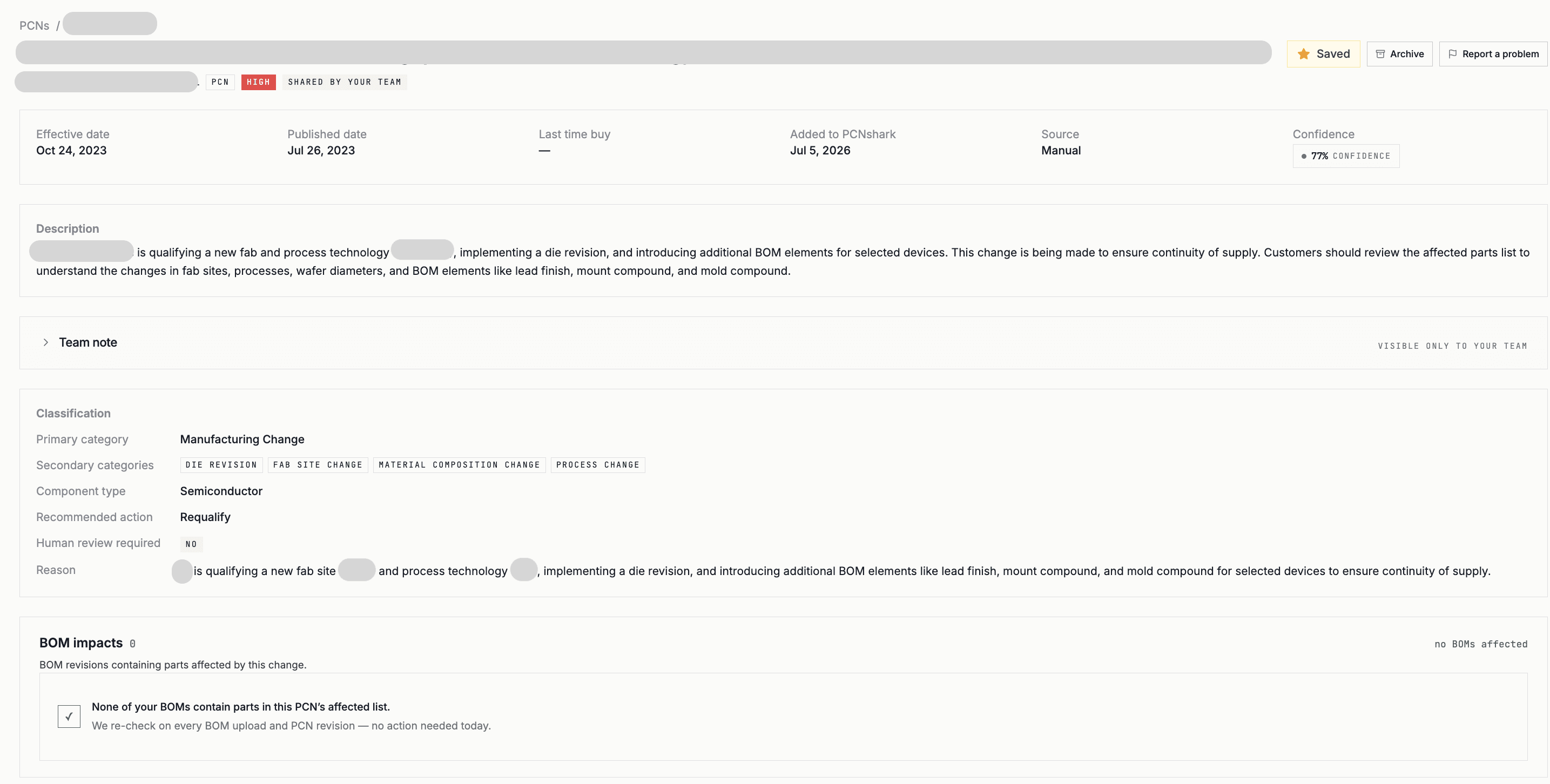
- 3Match and assign
Affected BOMs and products surface, each assigned to an owner with a tracked status.
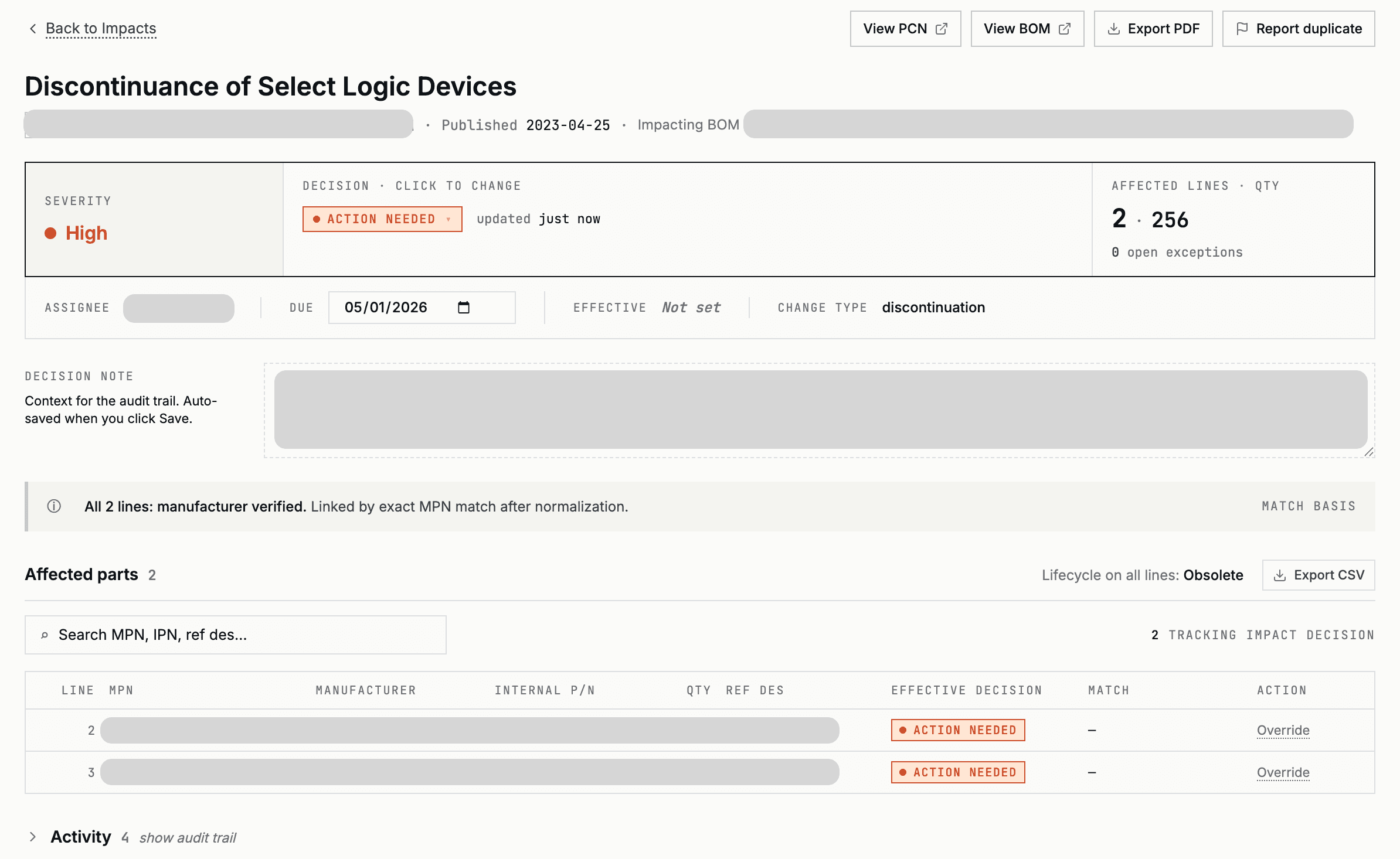
Example workflow — customer, manufacturer, and product information has been replaced.
What changes when the workflow moves out of inboxes and spreadsheets?
Save attachments or forward emails manually
Forward the email or upload the document into a structured notice record
Read the document and copy part numbers
Extract affected MPNs for human verification
Enter dates into a tracker or calendar
Retain effective, LTB, and last-ship dates with the notice
Search BOM files and revisions individually
Match affected MPNs against monitored BOMs
Trace parts through separate product records
Surface the products and assemblies containing a match
Use email, chat, or meetings
Record an owner, required action, and status
Update a separate spreadsheet
Keep the notice, review, action, and decision together
Search messages, files, and trackers
Review the preserved notice and response history
PCNshark does not replace engineering, quality, sourcing, or regulatory judgment. It organizes the notice, BOM impact, deadlines, ownership, and supporting record so the responsible team can make and document the decision.
Example: one discontinuation notice, two affected products
A semiconductor manufacturer issues a product discontinuation notice affecting 142 manufacturer part numbers. The notice includes a last-time-buy deadline and a proposed replacement. The receiving team must determine whether any affected part is used across its active products and establish who owns the response.
- Notice type
- Product discontinuation
- Affected MPNs
- 142
- Last-time-buy date
- September 30, 2027
- Last-ship date
- March 31, 2028
- Suggested replacement
- Provided by manufacturer
- Notice ingested
- Fields extracted and reviewed
- Affected MPNs normalized
- Active BOMs checked
- Potential matches surfaced
- Active BOM matches
- 4
- Affected products
- 2
- Owners assigned
- Engineering and Supply Chain
- Required responses
- Lifetime-buy analysis and alternate qualification
- Status
- In review
Illustrative, sanitized example. Figures are invented to show the workflow and do not represent a specific customer.
PCN management software helps teams convert supplier product-change notices into structured, BOM-specific actions. It typically centralizes notice intake, extracts affected parts and dates, identifies impacted products, assigns owners, and tracks the response through closure.
This guide covers what to look for, how PCN-to-BOM matching works, which data fields matter, and how to compare a focused PCN tool, a broader platform, and your current process — with a feature-evaluation table and a downloadable checklist you can use in a review.
What is a product change notice?
A product change notice (PCN) is a formal notice from a component manufacturer that a product is changing — its process, materials, packaging, or form, fit, and function. Semiconductor suppliers issue PCNs under the JEDEC standard J-STD-046 (Customer Notification of Product/Process Changes).
A related notice, the product discontinuance notice (PDN), tells you a product is being discontinued; discontinuance notices follow JEDEC J-STD-048. A PDN usually carries a last-time-buy (LTB) date — the deadline to place final orders — and a last-ship date.
Why PCNs are difficult to manage at scale
PCNs arrive as unstructured PDFs and emails, in inconsistent formats, from many manufacturers and distributors, on no shared schedule. A single product can depend on hundreds of parts across several BOMs and revisions, so deciding whether a given notice matters means cross-referencing it against everything you build.
Volume and timing make it worse: notices pile up, deadlines are easy to miss, and supplier compliance with notification windows is uneven. The work is repetitive, detail-sensitive, and unforgiving — exactly the kind of process that benefits from software.
Where PCNs come from
Notices reach teams through several fragmented channels, which is part of why they are hard to track:
- Manufacturer PCN/PDN portals and quality pages (often requiring an account to subscribe).
- Email alerts from manufacturers and authorized distributors.
- Distributor lifecycle and change feeds.
- Forwarded supplier emails landing in a shared inbox.
- Industry exchanges such as GIDEP for government/DMSMS programs.
The risks of email- and spreadsheet-based workflows
Most teams start by forwarding notices to a shared inbox and tracking them in a spreadsheet. It works until volume grows. Then the cracks show: notices get read and forgotten, the spreadsheet drifts from the real BOMs, no one owns a given notice, and last-time-buy dates slip past unnoticed.
The deeper problem is traceability. When an auditor, a customer, or your own team asks “what did we do about this change, and when?”, an inbox and a spreadsheet rarely give a clean answer.
What PCN management software should do
A focused PCN tool should take a notice from arrival to resolution. At minimum that means:
- Ingest notices from multiple sources, including PDFs and forwarded email.
- Extract the affected part numbers, change type, and key dates — and let a human verify and correct them.
- Match affected parts against your current BOMs to identify impacted products.
- Assign an owner and a follow-up action, and track it to resolution.
- Preserve the original notice and keep an audit history of decisions and deadlines.
How PCN-to-BOM matching works
The core of PCN management is connecting a notice to what you actually build. The software normalizes the manufacturer part numbers on the notice, compares them against the parts on your active BOMs (accounting for formatting differences and revisions), and surfaces the products and assemblies that contain a match.
Good matching is conservative about false negatives — a missed match is a missed deadline — and transparent about why a match was made, so an engineer can confirm it quickly rather than trusting a black box.
How PCNshark approaches the workflow
PCNshark is a focused PCN tool. You forward or upload a notice; it extracts the affected manufacturer part numbers, change type, and dates (including from scanned PDFs); it matches them against your active BOMs to show which products are affected; you assign an owner and track follow-up; and every notice, deadline, and decision is retained as a reviewable record.
It is intentionally focused: PCNshark does not try to be a component search engine or a compliance platform. It is the operating layer for acting on change notices — and for the decision that follows, each part carries an organization-wide component record with its lifecycle status and evidence, alternate recommendations (Team plans and above), distributor sourcing estimates, datasheets, and decision history. It runs on its own, or alongside a broader component-data provider.
When should you choose PCNshark instead of a broader component-data platform?
- Your main problem is processing notices your team receives
- You need email and document intake
- You need affected-part and date extraction
- You need BOM-level impact identification
- You need ownership and follow-up
- You want published self-service plans
- You already use another component-data source and need an operational response layer
- You need a comprehensive electronic-component database
- You need broad compliance and material-declaration data
- You need predictive lifecycle intelligence
- You need supplier and sub-tier risk analytics
- You need alternate and sourcing research across the entire component universe, beyond the parts on your BOMs
A broad platform supports component research and external intelligence, while PCNshark manages the internal workflow after a notice is received.
Side-by-side comparisons: PCNshark vs. SiliconExpert · PCNshark vs. Z2Data · Octopart vs. PCNshark
The data fields that matter on a PCN
Whatever tool you use, these are the fields worth capturing from each notice — they drive matching, deadlines, and follow-up.
- Manufacturer
- Anchors the notice to a supplier and disambiguates part numbers.
- PCN number
- The manufacturer's reference for the notice; the key for dedup and lookup.
- Issue date
- When the notice was published — the clock for notification windows.
- Effective date
- When the change takes effect in shipped product.
- Last-time-buy date
- The deadline to place final orders for a discontinued part.
- Last-ship date
- The last date the manufacturer will ship the part.
- Change type
- Process, material, packaging, form/fit/function, or discontinuance — drives severity.
- Change description
- The human-readable detail of what is changing and why.
- Affected MPNs
- The exact part numbers to match against your BOMs.
- Replacement MPNs
- The suggested or required successor part, if any.
- Qualification status
- Whether the change requires re-qualification on your side.
- Recommended customer action
- What the manufacturer advises you to do.
- Affected BOMs
- Which of your bills of materials — and products — contain a hit.
- Internal owner
- Who is responsible for the follow-up and decision.
- Review status
- Where the notice stands: new, in review, actioned, or closed.
Categories of software teams use for PCNs
Several kinds of tools touch this problem. None is universally “best” — the right choice depends on your scope.
Purpose-built for the PCN workflow: intake, extraction, BOM matching, ownership, and an auditable record. PCNshark is one option here.
Wide platforms (e.g. SiliconExpert, Z2Data) that include PCN/lifecycle data alongside component search, compliance, and supply-chain-risk analytics.
Manage product and item data and can store change records, but are not built to ingest and interpret incoming supplier PCNs.
Tools like Octopart help find parts and compare sourcing and lifecycle status, and point users to manufacturer PCN alerts, rather than running a PCN-to-BOM workflow.
The common starting point: a shared inbox and a tracker. Workable at low volume; fragile as notices and BOMs grow.
Custom scripts or databases tailored to one team's process — flexible, but a maintenance burden to keep accurate.
PCN software evaluation checklist
A vendor-neutral checklist for comparing tools (or your current process). Tick the capabilities that matter to you, then copy, print, or download it — no email required.
Your selections stay in your browser — nothing is uploaded, and no email is required to copy, print, or download.
How does PCNshark compare with your requirements?
PCNshark is designed around the core operational requirements in this checklist: notice intake, document extraction, human verification, BOM matching, ownership, deadline tracking, collaboration, and review history.
It is not intended to replace broad component search, compliance intelligence, predictive lifecycle data, or supplier-risk platforms.
A sample PCN-management SOP
A starting point you can adapt. Copy, print, or download it and tailor the owners to your organization.
| Stage | Suggested owner | Required output |
|---|---|---|
| Intake | Component or supply-chain team | Notice captured and preserved |
| Extraction | System plus reviewer | Verified MPNs, dates, and change details |
| Impact review | Engineering or component team | Affected BOMs and products confirmed |
| Response selection | Cross-functional owner | Accept, purchase, qualify alternate, or redesign |
| Closure | Program, quality, or component owner | Decision and evidence recorded |
Ownership varies by company, product, regulatory environment, and organizational structure.
Put this SOP into a shared PCN workflow
The SOP defines the process. PCNshark provides the operating record: the original notice, extracted information, BOM exposure, assigned owner, deadline, status, and final decision.
When spreadsheets stop working
There's no universal number of PCNs at which a spreadsheet fails. Watch for these signs that your process has outgrown it:
- Multiple active BOM revisions
- PCNs received across different inboxes
- No single accountable owner
- Missed or nearly missed last-time-buy dates
- Repeated manual MPN cross-referencing
- Difficulty proving who reviewed a notice
- Inconsistent naming and part-number formats
- No reliable closure record
A sample extracted PCN record
- Manufacturer
- Example Semiconductor
- Notice number
- PCN-2027-0473
- Notice type
- Product discontinuation (PDN)
- Issue date
- June 1, 2027
- Effective date
- September 30, 2027
- Last-time-buy date
- September 30, 2027
- Last-ship date
- March 31, 2028
- Affected MPN count
- 142
- Affected product families
- Logic, interface
- Change summary
- Device discontinued; suggested replacement provided
- Customer action
- Place last-time-buy or qualify alternate
- BOM matches
- 4 across 2 active products
- Internal owner
- Engineering + Supply Chain
- Review status
- In review
Illustrative, sanitized record. Values are invented to show the fields a PCN workflow captures and do not represent a specific customer or notice.
Ready to put this into practice on your own BOMs?
Start your 14-day trialOne workflow, different responsibilities
Ownership models vary by company; these are common ways teams divide a PCN response.
Review affected MPNs, understand the change, confirm BOM exposure, and coordinate alternate qualification.
Track last-time-buy and last-ship dates, evaluate purchasing exposure, and coordinate supplier follow-up.
Preserve the source notice, review evidence, qualification impact, and documented disposition.
Clarify ownership, status, dependencies, and whether each affected product has an agreed response.
Credible by design, not by claim
PCNshark earns trust through how it works — not through fabricated metrics or logos.
We state plainly what PCNshark covers — the notices your team forwards or uploads — and never claim complete coverage of every manufacturer or portal. It does not crawl notice feeds on your behalf.
Extracted MPNs, change types, and dates are reviewed by a person before anyone acts on them.
The source document stays attached to the record, so a reviewer or auditor can always check the original.
Starter, Team, and Scale plans are listed publicly — no opaque, sales-gated quotes.
Start a trial, upload a BOM, and process a notice without a mandatory sales call.
Use PCNshark standalone or as the operational layer next to a broader component-data platform.
Frequently asked questions
01What is the difference between a PCN and a PDN?+
02Is PCNshark a complete component-intelligence platform?+
03Can PCNshark replace SiliconExpert or Z2Data?+
04Can PCNshark be used alongside another component-data provider?+
05Does PCNshark automatically receive every PCN?+
06Can I upload PCNs that arrive by email?+
07Can PCNshark process scanned PDFs?+
08Does PCNshark make engineering decisions automatically?+
09How are PCN-to-BOM matches reviewed?+
10Can I start with an existing BOM?+
11What happens after the 14-day trial?+
Related resources
Where a focused PCN workflow fits before formal PLM change.
Read →EOL, last-time-buy, NRND, and BOM exposure.
Read →Focused PCN workflow vs. a broad data platform.
Read →Component search vs. PCN management.
Read →A dedicated PCN Manager vs. a standalone workflow.
Read →Official PCN resources from major manufacturers.
Read →Sources & references
- 01Texas Instruments — Product change notification (JEDEC J-STD-046 / J-STD-048)
- 02Texas Instruments — Product life cycle (PREVIEW → ACTIVE → NRND → LAST TIME BUY → OBSOLETE)
- 03GIDEP — Government-Industry Data Exchange Program (DMSMS notices)
- 04IEC 62402 — Obsolescence management
See which products are affected before a supplier deadline passes
Bring your BOMs and the notices your team already receives into one reviewable workflow. Extract the affected parts and dates, identify BOM exposure, assign an owner, and preserve the response record. PCNshark can be used as a focused standalone workflow or alongside an existing component-data platform.
Start your 14-day free trial on Starter or Team. A payment method is required; cancel before the trial ends to avoid being charged. Scale is a paid plan and starts immediately rather than with a trial.