Octopart for component search, PCNshark for PCN management.
PCNshark manages what happens after a supplier changes a part you already use: it extracts the affected manufacturer part numbers and deadlines from the notice, matches them against your active BOMs, and coordinates follow-up to closure. Octopart, by contrast, is built for finding, researching, and sourcing components in the first place — the two cover adjacent stages of the component lifecycle.
Is PCNshark an Octopart alternative?
PCNshark is not a direct replacement for Octopart's component-search and sourcing capabilities. It is an alternative for teams searching for a more operational PCN-management and BOM-impact workflow.
The products solve related but different problems and may be used together.
Where Octopart ends and PCNshark begins
The two cover adjacent stages. Octopart helps you find and evaluate parts; PCNshark takes over when a part you already use changes.
- Find and evaluate components
- Component search and sourcing research
- Design parts into a BOM
- A supplier change notice arrives
- PCNshark
- Extract → Match → Assign → Resolve
PCNshark does not integrate with Octopart. This shows where each tool fits in the lifecycle, not a connection between them.
Why teams add a focused PCN workflow
PCN management is the product, not a feature bolted onto a search or sourcing tool.
Forward supplier emails or upload the PCN and PDN documents your team already receives.
Extract affected MPNs, change details, and critical dates from supplier PDFs for human review.
Connect each notice to affected BOMs, products, assigned owners, actions, and status.
Keep using Octopart for research and sourcing; add PCNshark for the response after a part changes.
Starter, Team, and Scale plans are publicly listed, with a 14-day trial on Starter and Team.
Different tools for different stages
Before a part is designed into the product
Octopart strength- Search for components
- Compare parametric attributes
- Review distributor inventory
- Compare pricing and lead times
- Research datasheets
- Cost and source a BOM
PCNshark is not designed for this job — it begins after a supplier changes a part you already use.
After a supplier says an existing part is changing
PCNshark strength- Receive a supplier PCN or PDN document
- Extract affected MPNs and critical dates
- Review and correct extracted notice data
- Match the notice against active BOMs
- Identify affected products and assemblies
- Assign an owner and required response
- Track last-time-buy or qualification action
- Preserve the notice and final decision
Octopart's public materials primarily emphasize component search, sourcing, availability, lifecycle status, and BOM costing rather than a dedicated supplier-document response workflow.
Octopart helps teams choose and source components. PCNshark manages the response when a supplier later changes or discontinues one of those components.
What PCNshark does after a part changes
Octopart helps you find the part. This is what happens in PCNshark once a supplier says that part is changing.
- 1The change notice arrives
Forwarded by email or uploaded as a PDF; the original is preserved.
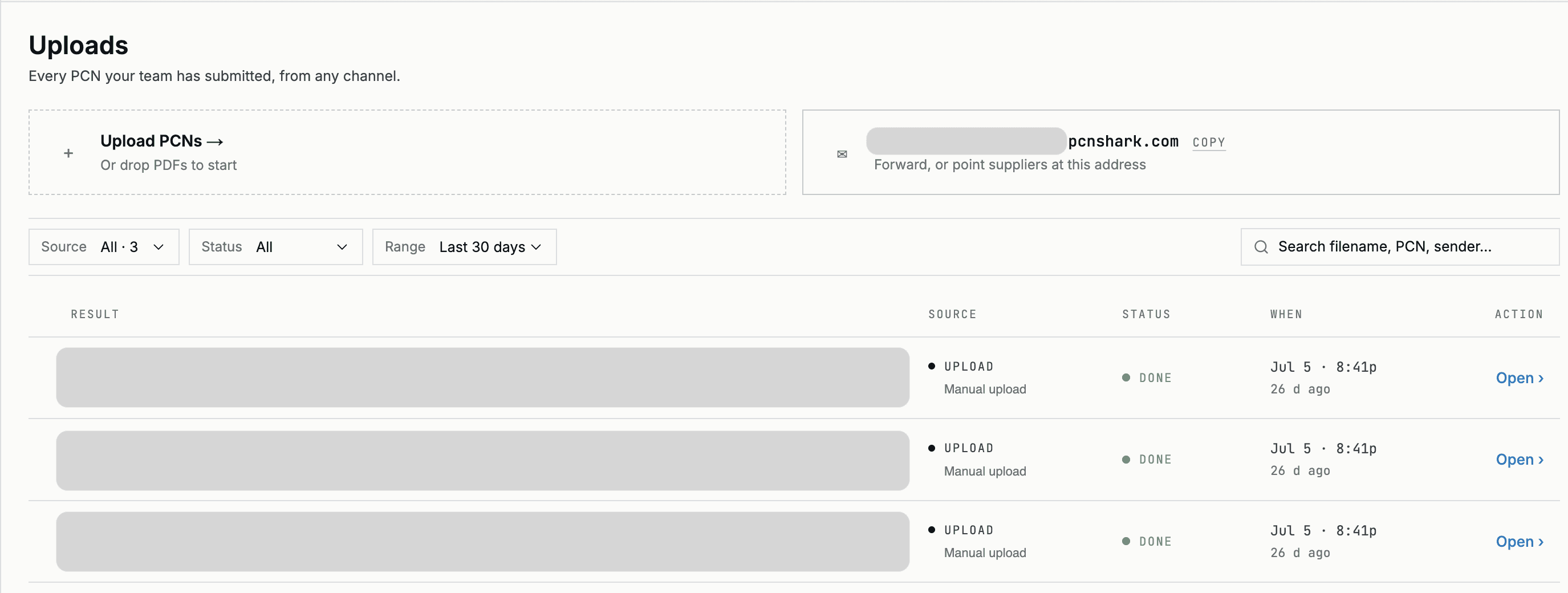
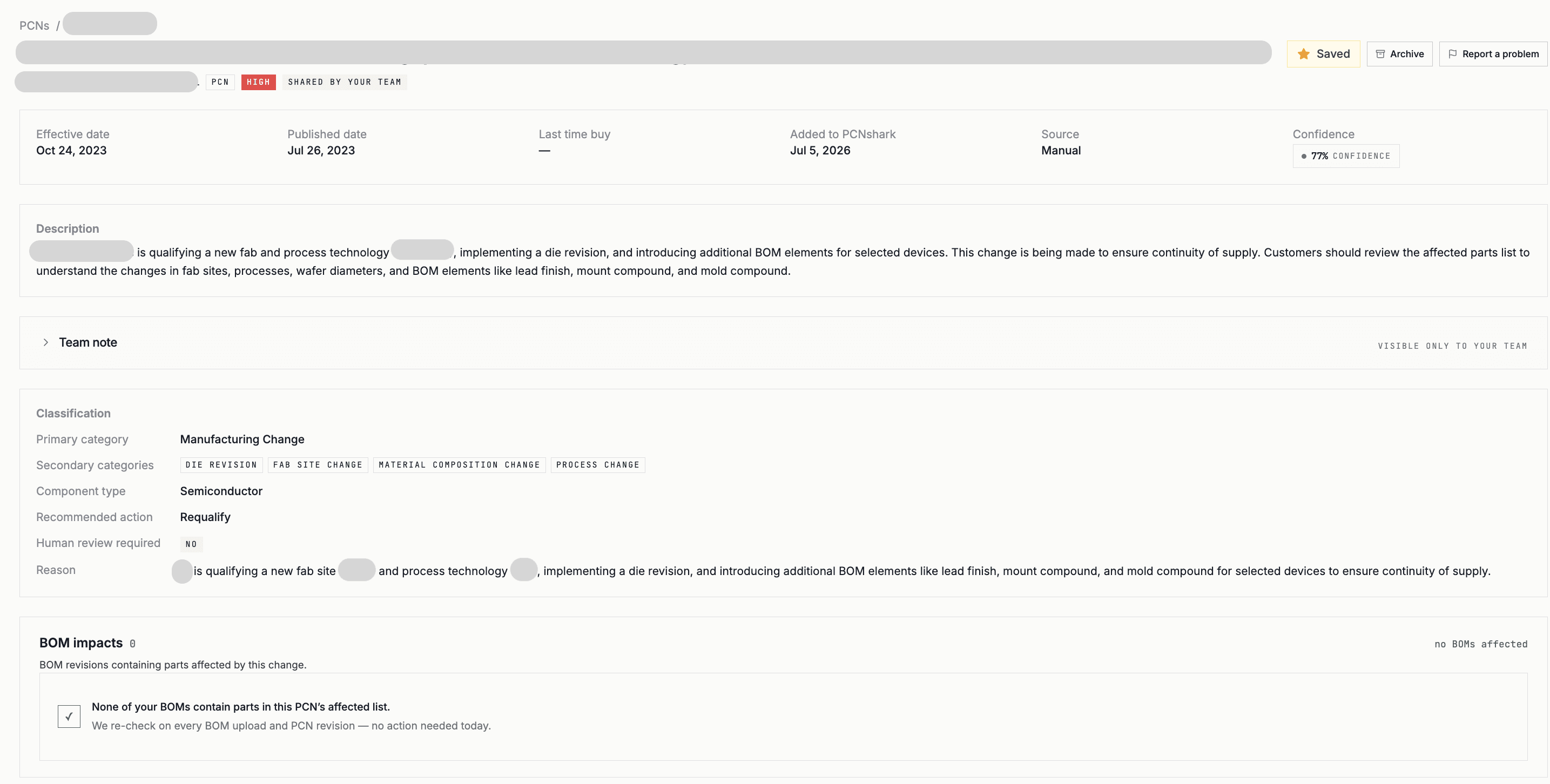
- 2Affected parts and dates extracted
MPNs, notice type, last-time-buy and last-ship dates — reviewed before action.
- 3Matched to your BOMs
Affected products surface, each with an owner and a follow-up status.
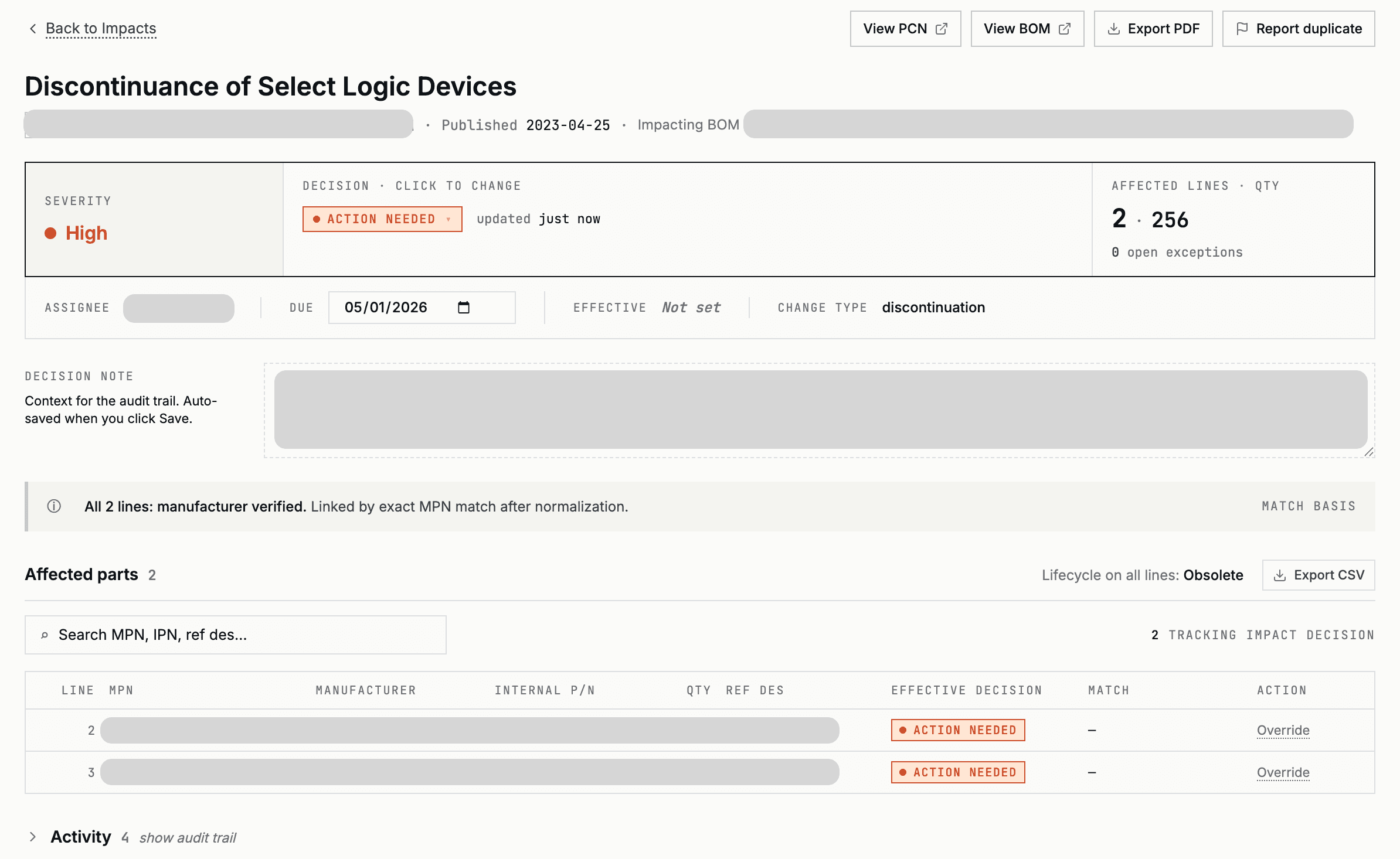
Example workflow — customer, manufacturer, and product information has been replaced.
Use PCNshark for
- Supplier PCN and PDN documents
- Affected-part extraction
- PCN-to-BOM impact
- Product exposure
- Ownership and follow-up
- Alternate recommendations (Team plans and above)
- Sourcing estimates on affected parts
- Decision history
Use Octopart for
- Component discovery
- Parametric search
- Distributor inventory
- Pricing and sourcing research
- BOM costing
Octopart supports part research and sourcing while PCNshark manages change notices for the parts already used in your products.
How the products can work together
Octopart is strong for finding and researching parts and comparing sourcing across distributors. PCNshark is strong for the operational workflow that begins when a part you already use changes.
A common pattern: use Octopart to research parts, alternates, availability, and pricing across the whole catalog — and use PCNshark to ingest the supplier change notices for parts on your BOMs, extract the affected MPNs and dates, match them to products, evaluate the notice's recommended replacement and spec-ranked alternates (Team plans and above), and track follow-up.
A PCNshark workflow, end to end
Where a component-search tool helps you look a part up, PCNshark runs the process that starts when a supplier tells you a part is changing:
- 01A supplier PCN, PDN, or EOL notice arrives — forwarded by email, uploaded as a PDF, or pulled from a portal.
- 02PCNshark extracts the affected manufacturer part numbers, change type, and key dates (effective, last-time-buy, last-ship).
- 03It matches those parts against your active BOMs to identify which products and assemblies are affected.
- 04You assign an owner and a follow-up action — place a last-time-buy, qualify an alternate, or accept the change.
- 05The notice, the affected parts, the deadlines, and the decisions are retained as a reviewable record.
Octopart helps teams find and research parts. PCNshark helps teams act when an existing part changes.
PCNshark is a strong fit when:
- You receive supplier PCNs, PDNs, and EOL notices and need to process them.
- You need to extract affected MPNs, change types, and deadlines from PDFs.
- You need to match notices against active BOMs to find affected products.
- You want to assign ownership and track follow-up to resolution.
- You need a reviewable record of changes, deadlines, and decisions.
- You want a PCN workflow alongside your component search and sourcing tools.
When PCNshark is not the right standalone fit
PCNshark is not intended to replace a component-search engine, distributor price comparison, inventory lookup, or sourcing marketplace.
See how PCNshark turns your first notice into a BOM-level impact — extract, match, assign, and track in one workflow.
Start your 14-day trialFrequently asked questions
01Can Octopart process supplier PCN PDFs?+
02What is the difference between BOM sourcing and BOM change monitoring?+
03Is PCNshark a component search engine?+
04Can PCNshark monitor BOMs for product changes?+
05Can I use Octopart and PCNshark together?+
06What is the difference between component search and PCN management?+
07Does PCNshark monitor end-of-life and last-time-buy notices?+
Competitor capabilities are evaluated using publicly available product pages and documentation. PCNshark does not rely on private competitor accounts or demonstrations for these comparisons. When functionality cannot be verified through public sources, we state that explicitly rather than assuming the capability is unavailable.
Sources & references
- 01Octopart — overview (Wikipedia) — Ownership, purpose, search, pricing/availability, lifecycle, BOM tool, API.
- 02Octopart — BOM tool
- 03Octopart — Where to find product change notifications — Octopart's own guidance to subscribe to manufacturer/distributor PCN alerts.
- 04Octopart — component lifecycle status
- 05Octopart — stock notifications
- 06Nexar API (Octopart data) — free Welcome 1K tier
Add a PCN workflow to your component research
Keep using your favorite search and sourcing tools. Let PCNshark handle the change notices: extract the affected parts and dates, match them to your BOMs, and track follow-up.
14-day free trial on Starter or Team — a payment method is required; cancel before it ends to avoid charges.
PCNshark is an independent product and is not affiliated with, endorsed by, or sponsored by Octopart. Product names and trademarks belong to their respective owners. This comparison is based on publicly available information and is intended to help buyers evaluate different approaches to component and PCN management.