Component Obsolescence Management: From EOL Notice to BOM-Level Action
Every electronic component has a lifecycle, and eventually most reach end of life. For hardware teams, obsolescence is a continuous risk: a part you depend on gets a discontinuation notice, a last-time-buy deadline appears, and you have weeks or months to buy ahead, qualify an alternate, or redesign.
- Extract affected MPNs, notice types, and critical dates
- Match discontinued parts against active BOMs
- Identify affected products and assemblies
- Assign engineering and supply-chain owners
- Track the response and preserve the decision record
Available on Starter and Team. A payment method is required.
What this guide — and PCNshark — focus on
PCNshark helps teams act after an EOL, PDN, NRND, or other supplier notice is received — identifying BOM exposure, critical dates, internal owners, and the required follow-up, and preserving the decision record. For the decision itself it supplies alternate candidates (Team plans and above) and distributor sourcing estimates on the component record.
It manages the response after a notice arrives; it does not predict when every component will become obsolete, and it does not replace predictive lifecycle databases, parametric component search, or compliance intelligence.
Do you have an obsolescence-response gap?
Knowing that a component is EOL or NRND is only the beginning. The operational risk comes from not knowing where the part is used, which deadline matters, who owns the response, or whether the decision was completed.
0 of 9 selected
Turn an EOL notice into an owned product response
PCNshark organizes the operational workflow after a notice arrives. Your engineering, quality, sourcing, and supply-chain teams remain responsible for the decision, while the source notice, affected parts, BOM exposure, deadlines, ownership, and status remain connected.
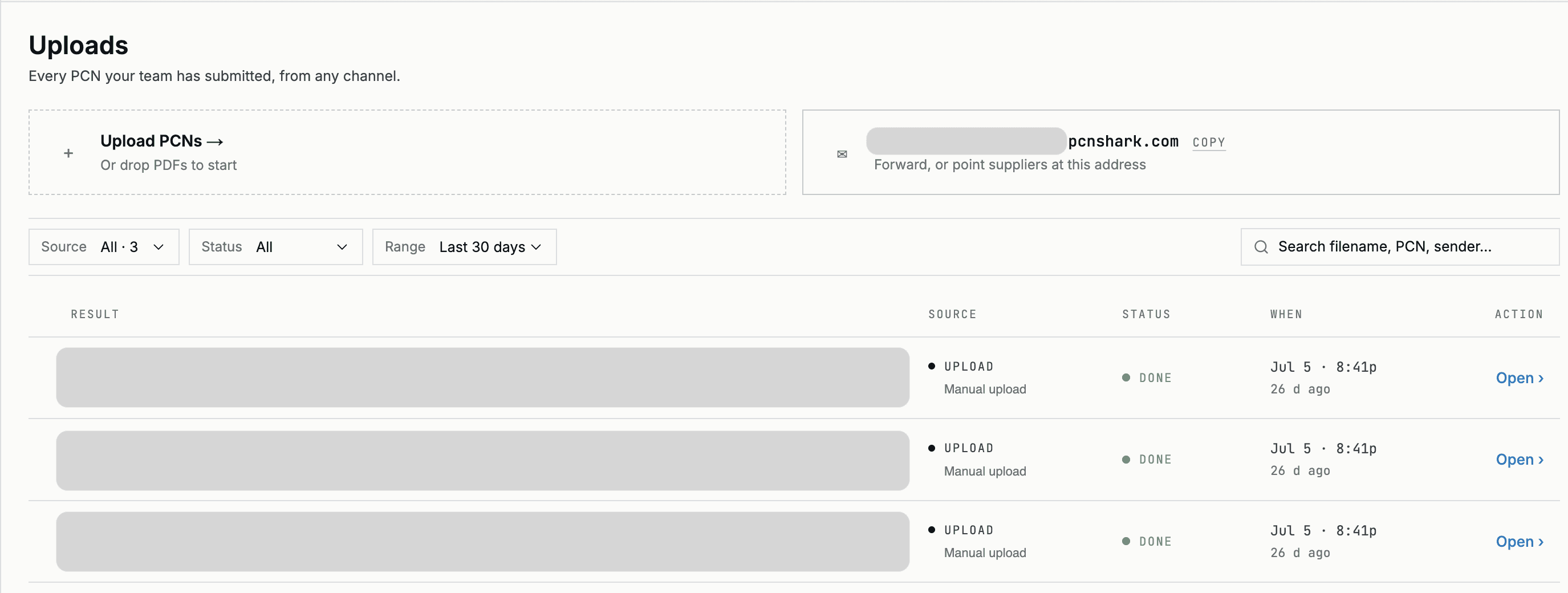
- 1Receive the notice
Forward the supplier email or upload the EOL, PDN, NRND, or product-change document; the original is preserved as the source record.
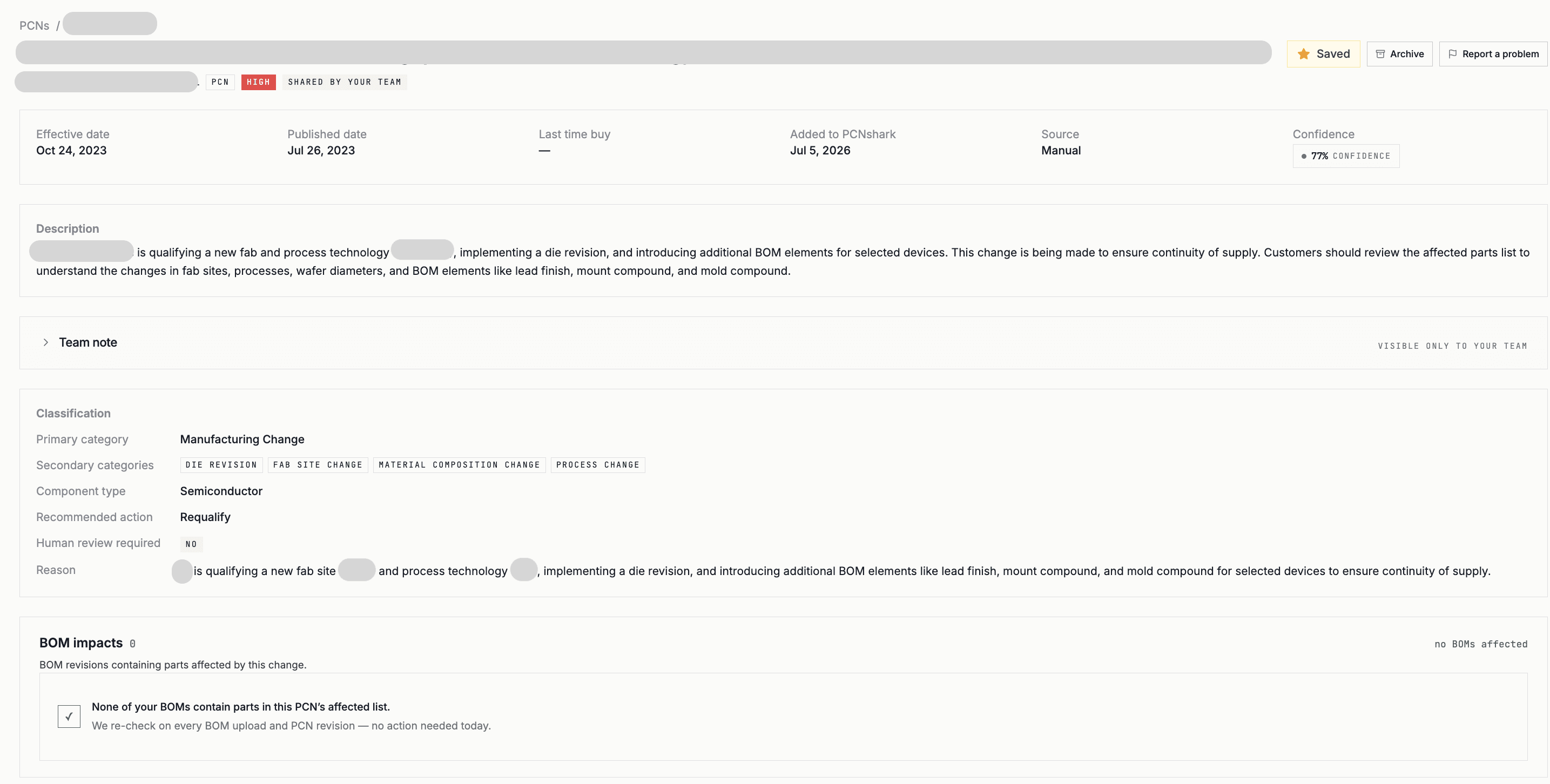
- 2Extract and verify the change
Affected MPNs, notice type, effective date, last-time-buy, last-ship, and proposed replacement — reviewed by a person before action.
- 3Identify exposure, assign, and track to closure
Affected products and assemblies surface with deadlines; each is assigned an owner and tracked through to a recorded decision.
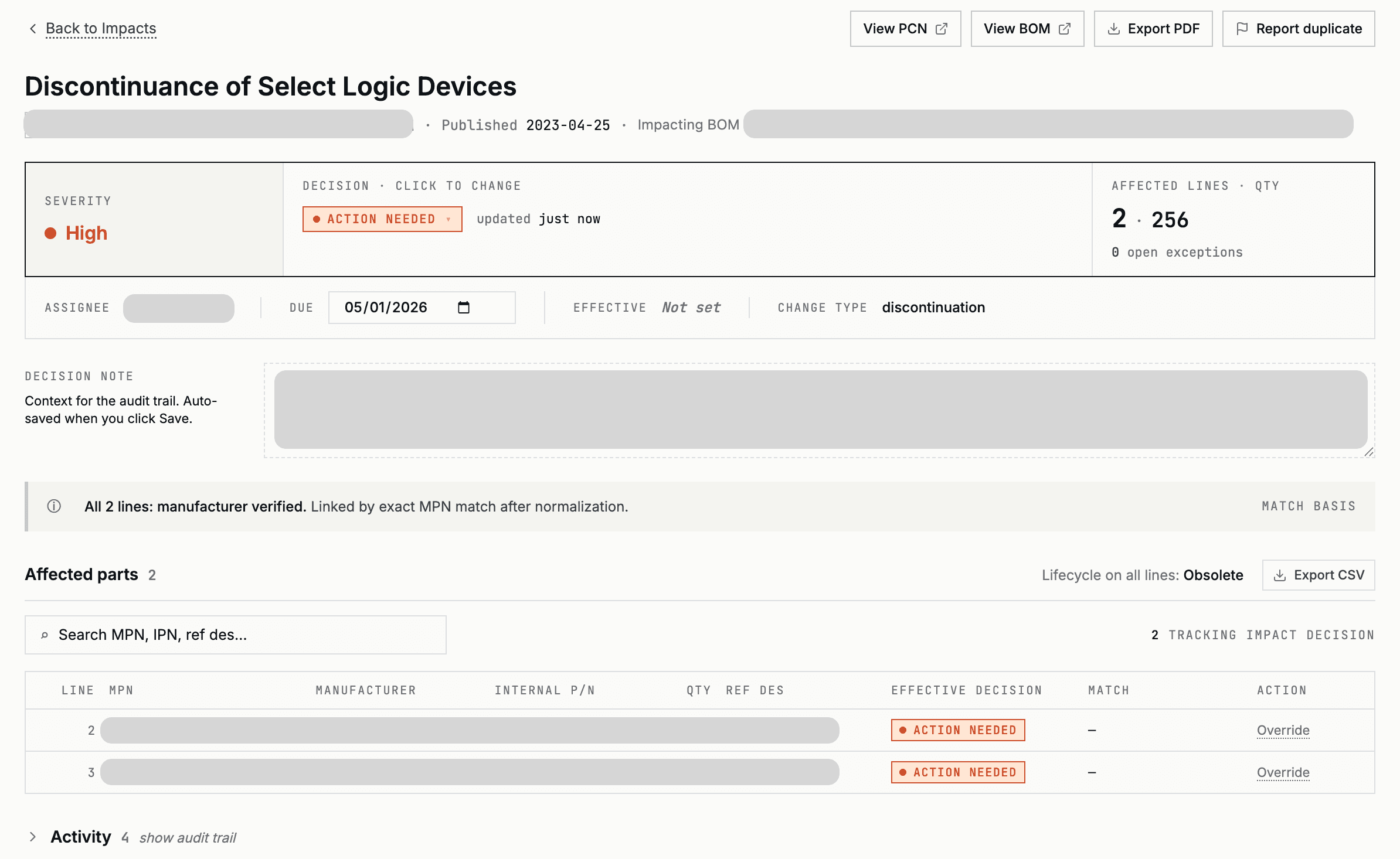
Example workflow — customer, manufacturer, and product information has been replaced.
What changes when obsolescence response moves out of inboxes and spreadsheets?
Notice remains in an individual or shared inbox
Forward the email or upload the notice into a structured record
Read the document and manually copy MPNs
Extract affected MPNs for human verification
Enter LTB and last-ship dates into a spreadsheet or calendar
Keep critical dates connected to the source notice
Search BOM files and revisions individually
Match affected MPNs against monitored BOMs
Trace BOM matches through separate product records
Surface affected products and assemblies
Follow up through email, chat, or meetings
Record an owner, action, priority, and status
Maintain separate trackers
Keep the response connected to the notice and product
Search messages, folders, and spreadsheets
Retain the notice, analysis, owner, action, and disposition together
PCNshark does not make engineering, quality, regulatory, sourcing, or commercial decisions automatically. It organizes the source notice, BOM impact, deadlines, ownership, and review record so the responsible team can make and document the decision.
Example: one discontinuation notice, two affected products
A semiconductor manufacturer issues a product discontinuation notice affecting 142 manufacturer part numbers. The notice includes a last-time-buy deadline, a last-ship date, and a proposed replacement. The receiving company must determine whether any affected parts appear in active products and decide whether to purchase lifetime demand, qualify an alternate, redesign, or close the notice with no impact.
- Notice type
- Product discontinuation
- Affected MPNs
- 142
- Issue date
- June 15, 2027
- Last-time-buy date
- September 30, 2027
- Last-ship date
- March 31, 2028
- Suggested replacement
- Provided by manufacturer
- Notice received and preserved
- Affected MPNs extracted and reviewed
- Critical dates retained
- Active BOMs checked
- Potential product matches surfaced
- Active BOM matches
- 4
- Affected products
- 2
- Owners assigned
- Component Engineering and Supply Chain
- Required actions
- Lifetime-buy analysis and alternate qualification
- Status
- In review
Illustrative, sanitized example. Figures are invented to show the workflow and do not represent a specific customer.
“Component obsolescence software” covers several distinct jobs — lifecycle-data monitoring, change-notice processing, BOM exposure analysis, and more. This guide explains the terms and the categories so you can match a tool to the job you actually need, and shows where a focused PCN/PDN workflow fits.
What component obsolescence is
Component obsolescence is the point at which a part is no longer produced or recommended, forcing a sourcing or design response. Managing it systematically is the subject of an international standard, IEC 62402 (Obsolescence Management), which defines policy, an obsolescence-management plan, and resolution strategies — and is adopted for use by the US Department of Defense.
Obsolescence rarely arrives without warning. It is signaled by lifecycle-status changes and by formal notices — and the teams that handle it well are the ones that see those signals early and route them to the right owner.
Lifecycle stages, NRND, and EOL
Manufacturers publish a lifecycle status for each part. Texas Instruments, for example, uses the stages PREVIEW → ACTIVE → NRND → LAST TIME BUY → OBSOLETE. Two stages matter most for risk:
- NRND (Not Recommended for New Designs): still available for existing designs, but the manufacturer recommends an alternate for new ones — an early warning.
- EOL / OBSOLETE: the part is being or has been discontinued and will no longer be produced.
EOL notices, PDNs, last-time-buy, and last-ship dates
Discontinuation is communicated through a product discontinuance notice (PDN), issued under JEDEC J-STD-048. A PDN typically defines two deadlines: a last-time-buy (LTB) date, the cutoff to place final orders, and a last-ship date, the last date the manufacturer will ship.
These dates are the action triggers. Miss the last-time-buy window and your options narrow to redesign or the broker market — so the notice has to reach the right owner with enough runway to decide.
BOM exposure: which products are affected
A lifecycle change only matters if it touches something you build. BOM exposure analysis answers “which of our products and assemblies use this part?” by matching the affected part numbers against your active bills of materials and revisions.
Without it, a discontinuation is just a notice in an inbox. With it, it becomes a specific, ownable list of affected products and deadlines.
Second-source evaluation and internal response
Once exposure is known, the response is a decision: place a last-time-buy bridge, qualify a second source or alternate, accept the change, or redesign. Each needs an owner, a deadline, and a record of what was decided and why.
This is where many teams struggle — not in finding lifecycle data, but in routing each signal to a person and tracking the response to closure. A clear owner and an auditable trail are what turn obsolescence data into managed risk.
Where PCNshark fits
PCNshark focuses on the PCN and PDN operational workflow: it takes the change and discontinuance notices you receive, extracts the affected parts and key dates (including last-time-buy and last-ship), matches them against your BOMs to show exposure, and lets you assign an owner and track the response as an auditable record. When the response means finding a replacement, it surfaces the manufacturer's recommended part and spec-ranked functional alternates (Team plans and above), with distributor stock, MOQ, price-break, and lead-time estimates as decision context — estimates, not quotes.
It is deliberately not a complete obsolescence suite. PCNshark does not forecast EOL across your component base or run compliance reporting — for those, a lifecycle-data provider or a broad component-intelligence platform is the right tool, and PCNshark can run alongside it as the operational layer for acting on notices.
When is PCNshark a strong fit — and when do you need more?
- Your team already receives PCNs, PDNs, EOL, or NRND notices
- The difficult part is determining BOM and product exposure
- You need to track last-time-buy, last-ship, or effective dates
- You need clear ownership for each affected product
- Notices, BOM checks, and decisions are spread across email and spreadsheets
- You use another component-data provider but still manage the response manually
- You want a focused, self-service workflow instead of a broad intelligence platform
- You need predictive lifecycle forecasting across your entire component base
- You need comprehensive parametric component search
- You need broad compliance or material-declaration intelligence
- You need alternate-part research across the entire component universe, beyond the parts on your BOMs
- You need supplier, geopolitical, or sub-tier risk analytics
- You require very broad vendor-maintained PCN discovery
The broader platform provides lifecycle, compliance, sourcing, or risk intelligence, while PCNshark manages the internal workflow after an actual notice is received.
Side-by-side comparisons: PCNshark vs. SiliconExpert · PCNshark vs. Z2Data · Octopart vs. PCNshark
Key obsolescence terms
A short glossary for the notices and statuses you'll encounter.
- Obsolescence
- A part is no longer produced/recommended, forcing a sourcing or design response. Managed per IEC 62402.
- EOL (End of Life)
- The product is being or has been discontinued and will no longer be produced.
- PDN (Product Discontinuance Notice)
- The formal discontinuation notice, issued under JEDEC J-STD-048.
- Last-time-buy (LTB)
- The deadline to place final orders for a discontinued part.
- Last-ship date
- The last date the manufacturer will ship the part.
- NRND
- Not Recommended for New Designs — available for existing designs; use an alternate for new ones.
- Second source
- An alternate, form-fit-function-compatible part qualified to replace the original.
- BOM exposure
- Which of your products and assemblies contain the affected part.
What to look for in obsolescence response
Whatever mix of tools you use, the response workflow should be able to:
- Capture EOL/PDN notices and their last-time-buy and last-ship dates.
- Identify which BOMs and products are exposed to an affected part.
- Flag NRND status as an early warning for new designs.
- Assign an owner and a response (LTB, qualify alternate, redesign, accept).
- Track deadlines so a last-time-buy window isn't missed.
- Keep an auditable record of decisions for customers and audits.
Not all component obsolescence tools solve the same problem
“Obsolescence software” spans several distinct jobs. Knowing which one you need avoids buying the wrong tool. PCNshark focuses on PCN/PDN intake, BOM exposure analysis, and response workflow management — not predictive lifecycle databases, search, alternate-part intelligence, compliance, or supplier-risk systems.
Forecasts when parts will reach end of life across your component base. Data-centric; broad component-intelligence platforms specialize here. Not a PCNshark function.
Find parts, datasheets, availability, and pricing across distributors. A research/sourcing job, not change-notice response.
Ingesting, extracting, and interpreting the change and discontinuance notices you receive. A core PCNshark job.
Connecting affected parts to your specific BOMs and products to determine exposure. A core PCNshark job.
Recommending and qualifying form-fit-function alternates. PCNshark surfaces manufacturer-recommended and spec-ranked candidates (Team plans and above) and records the decision; qualification remains an engineering judgment.
RoHS, REACH, conflict minerals, and similar regulatory tracking — a separate discipline from obsolescence. Not a PCNshark function.
Supplier, sub-tier, and geopolitical risk mapping and scoring. Not a PCNshark function.
Routing a received notice to an owner, tracking deadlines, and recording the decision. A core PCNshark job.
What should happen after an EOL or discontinuation notice arrives?
A repeatable path from a received notice to a recorded decision. Each numbered step is a question (with its branches) or an action.
- 01Notice received (EOL, PDN, NRND, or PCN).
- 02Is the affected part used on an active BOM?
- No →Preserve the notice and close with no active exposure.
- Yes →Continue to the deadline check.
- 03Is there a last-time-buy or last-ship deadline?
- Yes →Begin demand, inventory, and purchasing analysis.
- No →Continue technical and commercial review.
- 04Is an approved alternate already available?
- Yes →Confirm suitability and begin qualification.
- No →Search for an alternate, assess redesign, or evaluate strategic inventory.
- 05Does the response require customer, quality, or regulatory approval?
- Yes →Begin formal approval or requalification.
- No →Complete the internal disposition.
- 06Assign an owner.
- 07Record the action, evidence, status, and final decision.
- 08Close.
The correct response varies by product lifecycle, remaining demand, service obligations, qualification requirements, contractual commitments, customer requirements, and regulatory environment.
Common obsolescence-response strategies
Common situations and a potential response. Use it as a starting point, not a rule.
| Situation | Potential response |
|---|---|
| No active BOM exposure | Preserve the notice and close |
| Low remaining product demand | Evaluate a last-time buy |
| Long remaining production or service life | Strategic inventory, alternate qualification, or redesign |
| Approved form-fit-function alternate exists | Qualification and change-control review |
| No suitable alternate exists | Redesign or custom supply strategy |
| Change does not affect form, fit, function, quality, or reliability | Engineering and quality acceptance after review |
| Customer or regulatory approval is required | Formal requalification and approval workflow |
| Inventory already covers remaining demand | Document the analysis and monitor consumption |
| Multiple products are affected | Assign product-level owners and prioritize by deadline and business impact |
These are potential response paths, not automatic recommendations. The correct action depends on engineering, quality, sourcing, regulatory, contractual, customer, and commercial requirements.
Who should not choose PCNshark?
PCNshark is not a complete replacement for predictive lifecycle databases, broad compliance platforms, or supplier-risk systems. Its alternate recommendations (Team plans and above) and distributor sourcing estimates cover the parts on your BOMs, not the entire component universe.
Ready to put this into practice on your own BOMs?
Start your 14-day trialOne obsolescence workflow, different responsibilities
Ownership varies by company, product, quality system, and regulatory environment.
Confirm affected MPNs, determine product exposure, evaluate technical impact, and coordinate alternate qualification or redesign.
Track last-time-buy and last-ship dates, assess inventory and lifetime demand, and coordinate supplier or distributor action.
Preserve the source notice, review qualification impact, maintain supporting evidence, and document the final disposition.
Clarify ownership, deadlines, dependencies, status, and whether every affected product has an agreed response.
Credible by design, not by claim
PCNshark earns trust through how it works — not through fabricated metrics or logos.
Extracted MPNs, change types, and dates are reviewed by a person before anyone acts on them.
The source document stays attached to the record, so a reviewer or auditor can always check the original.
PCNshark works from the notices your team forwards or uploads — it does not crawl notice feeds on your behalf, and it never claims complete coverage of every manufacturer or part.
PCNshark manages the response after a notice arrives; it does not claim to predict every component's future lifecycle status.
Starter, Team, and Scale plans are listed publicly; start a trial and process a notice without a mandatory sales call.
Use PCNshark standalone or as the operational layer next to a lifecycle or component-data platform.
Frequently asked questions
01What is the difference between EOL, NRND, and last-time-buy?+
02Does PCNshark predict when a component will become obsolete?+
03Does PCNshark automatically discover every EOL or PDN notice?+
04Can I upload notices that arrive by email?+
05Can PCNshark match a discontinuation notice against my BOMs?+
06Can PCNshark identify which products are affected?+
07Does PCNshark recommend replacement parts?+
08Can PCNshark be used with SiliconExpert, Z2Data, or another lifecycle platform?+
09Who should own an obsolescence response?+
10What should happen before a last-time-buy deadline?+
11How should a team respond when no approved alternate exists?+
12Can PCNshark preserve the original notice and response record?+
13What happens after the 14-day trial?+
Related resources
The end-to-end PCN/PDN workflow in depth.
Read →The role workflow for EOL and obsolescence response.
Read →Component search/data vs. a PCN workflow.
Read →A broad risk platform vs. a focused PCN workflow.
Read →Official PCN/PDN/EOL resources by manufacturer.
Read →Sources & references
- 01IEC 62402 — Obsolescence management
- 02DAU — Adoption of the obsolescence management standard (IEC 62402)
- 03Texas Instruments — Product life cycle (NRND, EOL, LTB definitions)
- 04Texas Instruments — Product change notification (J-STD-046 / J-STD-048)
- 05GIDEP — Government-Industry Data Exchange Program (DMSMS)
Know which products are affected before the last-time-buy window closes
Bring your BOMs and the EOL, PDN, NRND, and product-change notices your team already receives into one reviewable workflow. Extract the affected parts and dates, identify BOM exposure, assign an owner, track the response, and preserve the final decision. PCNshark can be used as a focused standalone workflow or alongside an existing lifecycle or component-data platform.
Start your 14-day free trial on Starter or Team. A payment method is required; cancel before the trial ends to avoid being charged. Scale is a paid plan and starts immediately rather than with a trial.